
By MonsterTech.com Team · Published July 8, 2026 · Updated August 23, 2026
Key takeaways
- A wired backbone is what makes wireless performance predictable in a large home.
- Multiple access points with wired backhaul outperform a single powerful router.
- Managed switching and a capable gateway give the system headroom and visibility.
- Segmentation is useful where it solves a problem — guests, IoT, cameras — not as a default.
- Remote management turns most support issues into a phone call instead of a visit.
In a high-end home, the network is no longer a utility for laptops. It carries streaming video, distributed audio, cameras, lighting control, shades, climate, door hardware and the automation that ties them together. When it is undersized, the symptoms look like failing devices — and homeowners spend years replacing the wrong things.
Why premium smart home performance is a network problem
A high-end home routinely runs well over a hundred connected devices. Every keypad, sensor, shade motor, speaker zone, camera, television and controller sits on the same infrastructure. The automation experience — a scene that fires instantly, a camera that opens without lag, music that starts in every room at once — is a direct reflection of what is underneath.
The single-router approach fails quietly here. It does not stop working; it just becomes inconsistent. And inconsistency is worse than failure, because it sends homeowners chasing individual devices instead of the cause.
The wired backbone
Structured cabling to every meaningful location is the foundation: televisions, media locations, offices, camera positions, gate and entry hardware, control processors and each ceiling position where an access point belongs.
In new construction or renovation, this is inexpensive to do generously. In a finished home, careful routing through attic and chase space still makes most of it achievable, and it is worth doing — a wired path always outperforms fighting a wireless one.
Professional Wi-Fi architecture with multiple access points
Large homes are covered with several purpose-built access points rather than one high-power device. Each is placed for the area it serves, each has a wired connection back to the switch, and devices hand off between them as people move through the house.
Wired backhaul is the point that gets skipped most often. Access points that relay to each other wirelessly lose capacity with each hop, which is exactly the wrong tradeoff in a home full of video and audio streams. Professional platforms such as Ubiquiti's UniFi line are one example of the category of equipment built for this kind of deployment; we specify whichever platform fits the home, and we are not affiliated with any manufacturer.
- Access points placed by coverage area and device density
- Dedicated wired uplink to every access point
- Central management of the whole wireless system
- Outdoor coverage planned for patios, pool decks and gate areas
Switching, gateway and the rack
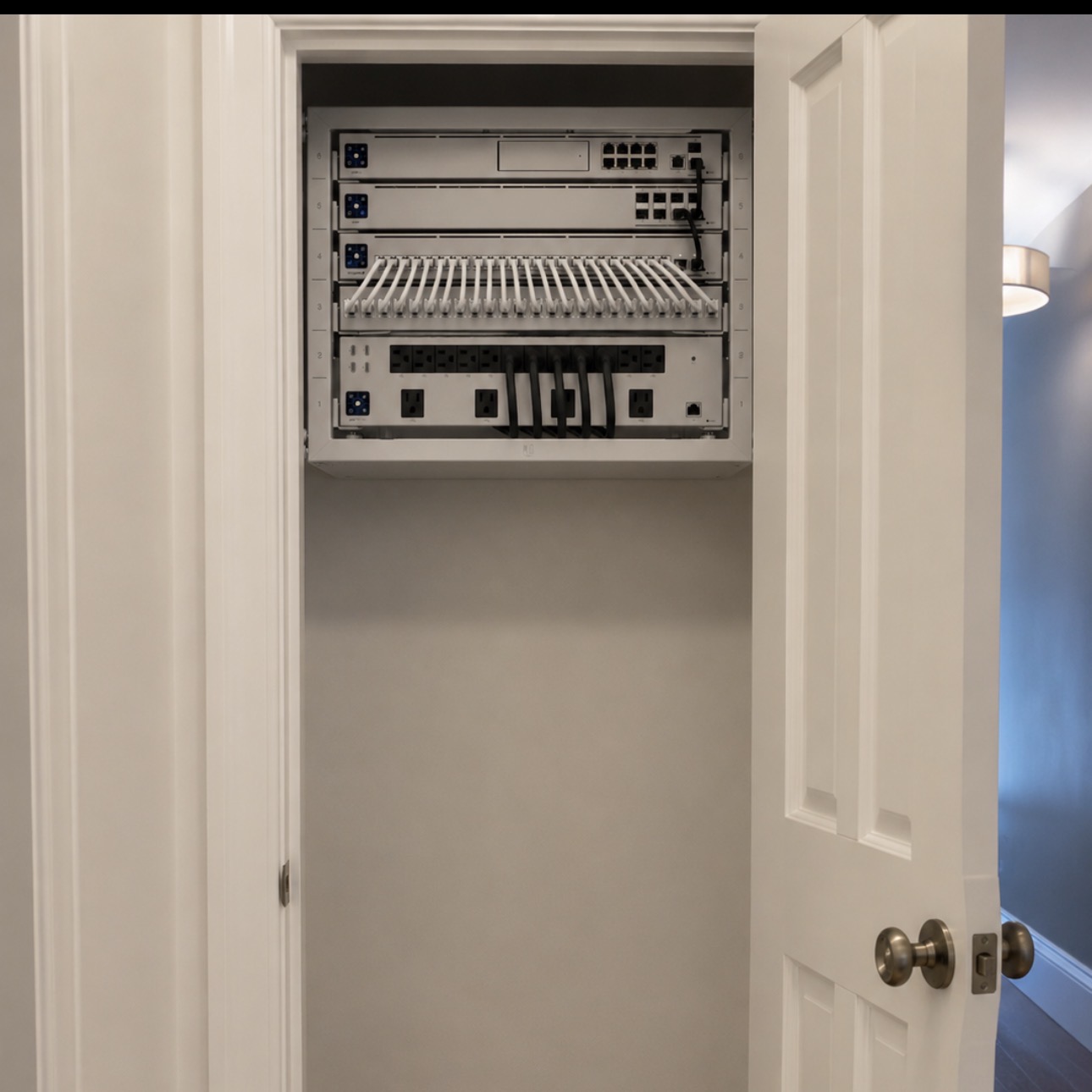
A managed PoE switch powers access points and cameras and provides visibility into what each port is doing. A capable gateway handles the connection, routing and remote access without becoming the bottleneck when several 4K streams and a video call are running at once.
All of it belongs in a proper rack in a ventilated, accessible location — with a patch panel, labeled runs, battery backup and room for the next addition. An organized rack is also what makes service quick and non-invasive years later.
Segmentation where it earns its place
Separating traffic is useful when it solves something specific: a guest network for visitors and short-term guests, a separate space for IoT devices with weaker security models, or isolation for cameras and control systems.
It is not automatically the right answer for every home. Over-segmenting a residence can break device discovery for casting, speakers and control apps in ways that frustrate everyone. We use it deliberately, and we make sure the automation still works across it.
AV, cameras and automation on one foundation
Distributed audio, theater and media rooms, video distribution, surveillance and automation controllers all place different demands on the network — sustained bandwidth, low latency, or simply never dropping offline.
Designing them together avoids the common outcome of a home where each subsystem was installed by someone solving only their own problem. One network, planned once, supports all of it and stays serviceable.
Coverage, capacity and the Florida house
Central Florida homes bring specific challenges: block exterior walls, tile roofs, detached casitas, long lanais, pool decks and gated entries. Coverage has to extend outdoors without leaving the interior compromised.
Capacity matters just as much. A house with four people streaming, a dozen cameras uploading and eighty automation devices checking in has a very different profile than square footage alone suggests.
Remote management and support
Professionally managed networks can be monitored and adjusted remotely. Most issues — a device that needs a nudge, a setting change after a new purchase, a firmware update — get resolved without anyone driving out.
MonsterTech.com has installed home technology across Central Florida since 2002, and our installations include a 1-year workmanship warranty and 30-day installation support.
Frequently asked questions
- Can a finished home be retrofitted with a wired network?
- In most cases, yes. Attic and chase routing makes many locations reachable. Where a wired path truly is not possible, we design around it rather than pretending a wireless link is equivalent.
- How many access points does a large home need?
- It depends on layout, construction and outdoor areas rather than square footage alone. A walkthrough is the only way to answer it accurately.
- Do you recommend a specific brand of networking equipment?
- We specify professional-grade equipment appropriate to the home. Platforms like Ubiquiti UniFi are one example of that category. We are not affiliated with any manufacturer and choose based on fit and long-term supportability.